Employees lose 44 days a year to manual tasks, according to research by Frends and Sapio. For a 1,000-employee organization, that’s €10.7 million annually in direct salary costs alone.
Executing repetitive manual tasks means team members spend more time on recurring work and less on high value activities. In other words, instead of developing new ideas or building customer relationships, your employees spend hours updating spreadsheets and adding leads to the CRM. The result? Lost productivity, higher labor costs, more human errors, and employee burnout.
AI agents and traditional automation can help.
According to PwC’s 2025 AI Agent Survey of 308 US business executives, 66% of companies adopting AI agents report increased productivity, 57% report cost savings, 55% report faster decision-making, and 54% report improved customer experience.
Traditional automation can also deliver significant savings. Deloitte found that automating high-volume transactional processes reduced the average time and associated cost of execution by 60% to 80%.
The big question is: Which is better for your workflow? AI agents or traditional automation? Or maybe both? I answer that below, along with the key difference between AI agents vs. traditional automation.
Key Takeaways
- There is no single “best” option for your business.
- The best system depends on the tasks in your workflow.
- Use AI agents for complex tasks that require interpretation and judgement.
- Keep humans in the loop to review, approve, and correct decisions when necessary.
- Use traditional automation for predictable and repetitive tasks that follow a predefined rule.
- Consider the hybrid approach for predictable tasks and tasks that require interpretation and judgement.
What is traditional automation?
Traditional automation involves setting up tasks to run automatically. It’s suitable for predefined, repetitive workflows that require no decision-making or reasoning.
The logic behind traditional automation is simple: If A happens, do B. For instance, if a customer submits a form, add them to your CRM. Or if a payment is overdue by 30 days, send an automated late-payment notice.
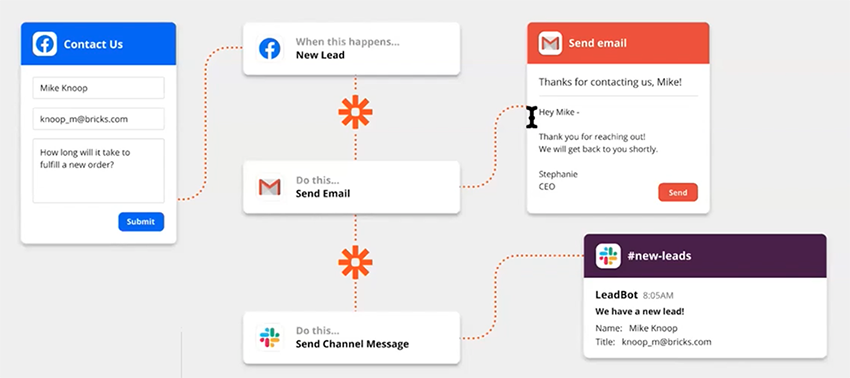
Because the process is static and repetitive, traditional automation is reliable. Additionally, the chances of error are minimal, compared to AI agents. However, this also means that if the input changes—even slightly—the automation breaks. Unlike AI agents, traditional automation can’t make judgement calls in such situations.
What is an AI agent?
AI agents don’t follow a strict script like traditional automation. They’re built on large language models (LLMs) and machine learning. This makes them intelligent enough to act autonomously and adapt in unexpected scenarios.
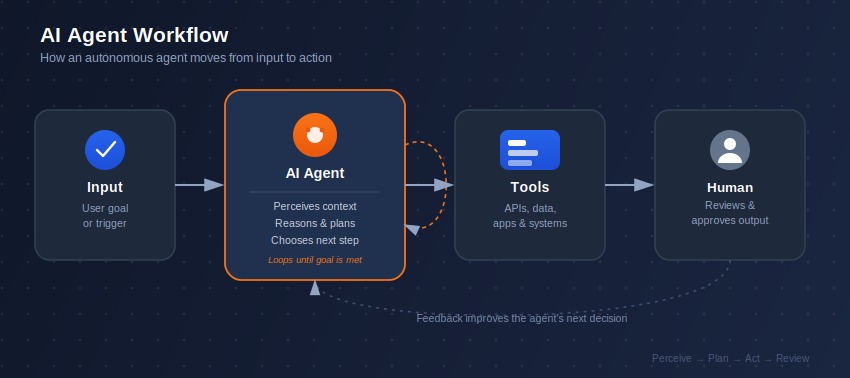
Think of AI agents like a personal assistant. Or a mini Jarvis (Iron Man’s AI assistant). You give them a goal, and they figure out how to achieve it without your supervision. For instance, you could use agentic AI for customer support.
Here’s how:
- Customer ask question
- Agent finds the answer.
- Agent responds
- It escalates complex issues to a human.
- It records the interaction in the support system.
AI agents make judgement calls based on available context and the tools they have access to (CRM, knowledge base, help desk, and so on). As a result, their decisions can vary per run, especially as the context changes.
While AI agents are flexible, they make decisions based on probabilities. This makes them less reliable than traditional automation, which follows strict, predetermined rules set by a human programmer.
What’s the difference Between AI Agents and Traditional Automation?
On the surface, AI agents and traditional automation seem similar. Sure, they automate repetitive tasks and are triggered by events. But they execute tasks differently.
Key Differences Between Agentic AI and Traditional Automation at a Glance
| Automation | AI Agent | |
|---|---|---|
| Instructions | Predefined rules | Goal + constraints |
| Decision-making | Limited | Yes |
| Inputs | Mostly structured | Structured + unstructured |
| Workflow | Fixed | Dynamic |
| Predictability | High | Lower |
| Best for | Repetitive processes | Judgment-heavy work |
Below, I explain how AI agents and traditional automation differ.
Flexibility and adaptability
AI agents can respond to context, assess situations, and adjust their actions accordingly in real time. This makes them flexible and perfect for unpredictable tasks that require multi-step reasoning.
For example, if a customer says. “I want to cancel my order.” An AI agent processes the cancellation straightaway. But what if the customer says something different and ambiguous, like “it’s still not working”?
The agent asks a follow-up question to understand what they’re referring to, drawing context from chat history before attempting to resolve it.
Traditional automation is quite different. An automation designed to execute order cancellation, for instance, would fail or be non-responsive if asked to add leads to CRM.
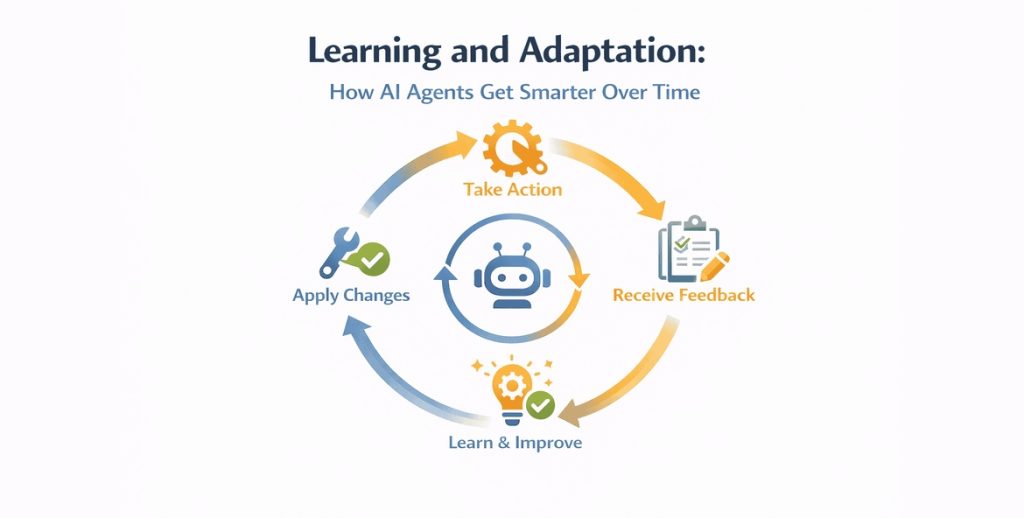
AI agents can also adapt. This means they can respond differently if circumstances change. For instance, if the typical customer request changes from “tell me this price of this item” to “we need this item for a team of 100 people,” an AI agent can interpret context and provide an enterprise option or connect them to your sales team.
Traditional automation, on the other hand, would fail or stall. Why? They’re static and follow predefined rules (if X happens, do Y; if a customer asks about pricing, send pricing information). Think same input, same output. So if a variable in the input changes, it cannot adapt until a human intervenes.
Speed and efficiency
Traditional automation executes fixed, predefined workflows without reasoning or decision-making. This makes it fast and efficient. For instance, a customer makes a purchase; traditional automation automatically sends a confirmation email.
An agent, meanwhile, may spend time checking the order, confirming payment, updating the inventory, and deciding whether the order can be fulfilled before updating the customer.
That said, traditional automation is efficient and fast for stable, repetitive tasks. Throw in unstructured data that require judgement and it freezes. Agentic AI thrive in these situations because it can reason, interpret context, and make decisions.
Accuracy and consistency
If you run an automation say 100 or 1,000 times, you’ll get the same accurate result—like clockwork. This is because it runs on ready-made rules.
Take an alarm clock, for example. If you set it to ring at 6 am, it does exactly that every day, consistently and without fail. It doesn’t mind if you slept late or have an important meeting.
But there’s a limit. Automation stalls when it encounters situations outside the rules it was programmed for. For example:
Normal scenario: Customer submits a cancel request → Cancel the order.
Unexpected scenario: Customer says, “I want to cancel, but I was charged two days ago. Can I get a refund first?”
If the automation has no rule for this situation, it’ll freeze. Or break. Though AI agents are less accurate and consistent (because they make decisions rather than follow predefined rules), they are better at reasoning their way out of unfamiliar situations.
Maintenance
What happens when your business process changes? Say, instead of notifying your sales team after a customer submits a complaint, you want the manager to be notified too.
Since automation lacks reasoning to adapt, manual updates become necessary (adding the manager to the notification steps). And if your process or data format changes regularly, you may have to do ongoing maintenance. That’s almost like a full-time job, if you ask me.
AI agents, on the other hand, can reason and make autonomous decisions. This allows them to adapt easily to minor variations or new information. But it doesn’t make them maintenance-free. Over time, AI agents may require maintenance—prompt instruction tuning, guardrails and review, and monitoring for drift —to ensure they don’t go rogue.
And if something goes wrong? Debugging AI agents is much harder than traditional automation. This is due to the complexity of their reasoning. In comparison, automation follows a clear and predictable workflow.
So if something in the system breaks, you know where to look and what to do—update a broken integration, reconnect an account, change a rule, add or remove a step/tool, and so on. With AI agents, it’s like staring in the dark.
Control and oversight
With automation, it’s easier to control what happens because you set the rules and logic upfront. Email arrives with “complaint” in the subject line? Route to customer service. Form submitted to your website? Add the data to your CRM.
It’s different with AI agents. Instead of setting predefined rules and instructions, you give them a goal, and they decide how to achieve it by making educated guesses. This means their decisions are out of your control.
Additionally, since AI agents act autonomously and don’t follow a predefined script, it can be harder to monitor their behavior and detect and correct anomalies in real time.
Traditional automation, on the other hand, follows predefined rules and logic. This makes monitoring easy, as you know exactly what it should do and when it should do it. And if something breaks, it’s usually easy to trace the exact cause.
Cost
AI agents cost more to run because they’re built on top of large language models. Each LLM request or call (what you send to the AI and what it generates in response) costs tokens. Because the AI agent takes multiple steps to fulfill one request, token usage can skyrocket, driving up operational costs.
Traditional automation runs on predictable and fixed rules. Unlike AI agents, it doesn’t make LLM calls to execute tasks. This makes it cheaper to operate. But there’s a tradeoff. Traditional automation cannot adapt to changing circumstances, making maintenance costlier compared to AI agents.
When Should Your Business Use Traditional Automation?
Though not as advanced as AI agents, traditional automation still plays an important role in some aspects of your business operations.
Best Use Cases
Use traditional automation when:
- The process is predictable: Use traditional automation if the process follows the same pattern every time. E.g.: A customer fills out a form, and their details are automatically added to the CRM.
- The rules are clear: Use traditional automation when you can easily tell the system what to do in a given condition. E.g., if an invoice is overdue, send a reminder to the customer.
- You need consistency: If you want the process to run over and over again, traditional automation is your best bet. E.g., sending payment reminders.
- You need control: Use traditional automation when you want a system that lets you dictate exactly how it operates under specific conditions. E.g., “If X happens, do Y”
- Reliability is non-negotiable: Traditional automation is suitable when you’re dealing with tasks that must run consistently and as expected—without deviation or errors. E.g., payroll processing, tax calculations, and so on.
When Should Your Business Use AI Agents?
AI agents suit non-routine tasks that require interpreting context, reasoning, and decision-making.
Best Use Cases
Use AI agents when:
- Context matters: AI agents can understand a situation based on surrounding information. For example, addressing customer complaints, qualifying sales leads, and handling refund requests.
- Judgment is needed: Use agentic AI when handling tasks that require a system to make autonomous decisions based on available information. For example, qualifying leads, reviewing refund requests, and deciding whether to escalate a complaint.
- The situation can change: AI agents make sense when tasks are unpredictable, and the system needs to adapt to new information. For example, following up with sales leads, recovering abandoned carts, and following up on unpaid invoices.
- The task involves unstructured information: AI agents can handle tasks involving data that doesn’t follow a fixed structure, e.g., emails, documents, conversations, voice recordings, etc.
- The task requires using multiple tools: Use AI agents when the task requires pulling information and data from multiple tools. For instance, customer onboarding, preparing sales briefs, and processing invoices.
Further reading: Risks of giving AI agents too much autonomy
AI Agents Vs Traditional Automation: Real World Examples
Want to better understand the difference between AI agents vs traditional automation? I curated some real-world examples that help you do just that.
Customer onboarding
Automation: Sends welcome email after a customer subscribes to a newsletter
AI agent: Examines the customer journey before signing up and sends a personalized welcome email and onboarding resources
Customer support
Automation: Autoreplies “Your ticket has been received” to every support email
AI agent: Reads the message, understands the customer wants a refund, and responds appropriately based on their situation
Sales
Automation: Send a follow-up message to lead 2 days after signing up
AI agent: Read the lead’s previous messages to understand context, decide what they need, and write a follow-up.
Finance
Automation: Send payment reminders to customers with overdue invoices based on a preselected schedule.
AI agent: Check overdue accounts, considers customer’s payment history and past conversations, determine the right follow-up, and compose a message.
Marketing
Automation: Pause an ad when its cost per click surpasses a preset limit.
AI agent: Review ad performance across campaigns, determine why costs are skyrocketing, and suggest or make changes based on the findings.
HR
Automation: Notifies a manager when an employee submits a leave request
Ai agent: Check the employee remaining leave days, review the request, ensures there are no scheduling conflict, determines whether it requires manager approval consent
Based on the examples, the pattern is clear: Automation is best for predictable tasks that follow a static rule (If X happens, then do Y). Meanwhile, AI agents suit tasks that require reasoning, interpreting context, and adapting to new information.
The Biggest Risks of Choosing the Wrong One
Choosing the wrong system can lead to higher costs, unnecessary complexity, frequent manual adjustments, and rigid workflows.
Using an AI agent for a simple workflow
Using an AI agent for simple, predictable tasks that are best handled by traditional automation is a waste of money. It’s like hiring an accountant for calculations where a simple calculator would suffice.
Aside from the unnecessary expense, you also have to deal with inconsistent results on tasks that need reliable, predictable outcomes. For instance, if you put an AI agent in charge of invoice calculations, even a small variation could cost your business.
Using traditional automation for work that requires judgement
Setting up traditional automation for judgment-based tasks can lead to poor customer experience. Here’s an example: If you set up an automation to send “your order has arrived” if an order is marked as delivered, it’ll become unresponsive or break if the customer replies, “It says delivered, but I’m yet to receive it.”
It’s like giving a customer service representative a script for every possible customer request. If a customer asks a question that isn’t on the script, the representative becomes unresponsive. Of course, you know what happens next.
An AI agent, meanwhile, would understand the message, examine the order and delivery information, determine the next step, then resolve or escalate the issue.
Also, since traditional automation cannot adapt when situations change, frequent manual adjustments become necessary. This means higher operational costs and more time spent on maintenance.
Should You Replace Automation with AI Agents?
You shouldn’t replace traditional automation with AI agents just because they’re more advanced. Or because your competitors are adopting them and you’re scared your business might fall behind if you don’t.
Think about it. If you set up an automation that sends a payment reminder when an invoice becomes overdue, and it does it well, consistently, and without variation, why switch to an AI agent?
Moreover, replacing automation with AI agents doesn’t automatically send your ROI to the moon. In fact, only 10 % of organizations already using agentic AI reported significant, measurable ROI, according to a Deloitte 2025 survey.
So when should you replace traditional automation with AI agents?
1. When handling unstructured information
Consider AI agents if your workflow involves unstructured information. Think chat messages, support tickets, meeting notes, and customer emails. Switching to an AI agent makes sense in that scenario because automation cannot handle information that doesn’t follow a fixed format.
2. If your employees keep intervening
Does your automation break often because it cannot handle requests outside its programming? And each time, your employees have to intervene? You may want to consider AI agents. They’re autonomous and can adapt to changing circumstances.
3. Too many exceptions
If your automation keeps encountering situations that don’t fit its rules, you may want to consider AI agents. Let’s take automated expense management, for example. Normally, when an employee submits an expense, the system sends it to the relevant manager for approval.
But what if there is an exception? Say the manager isn’t available. Or the employee submits the wrong expense. Adding rules for each exception can complicate the automation and add more dollars to maintenance cost. Switching to AI agents makes more sense.
4. If tasks require human interpretation
Replace your automation system with AI agents if you’re handling tasks that require humans to interpret information and make judgment calls. Unlike traditional automation, which executes tasks using predefined rules, AI agents are built on LLMs and therefore have reasoning and decision-making capabilities.
One thing to keep in mind: You don’t have to replace your entire workflow with AI agents. A smarter approach? Identify steps that require heavy decision-making and introduce an agent.
For example, keep automation for adding new leads to CRM and sending follow-up emails. But use an AI agent to qualify leads and decide which ones deserve immediate attention.
When Should You Combine AI Agents with Traditional Automation?
Today, successful businesses aren’t trying to replace traditional automation with AI agents. Instead, they’re combining both for flexibility and improved workflow efficiency.
AI agents handle unpredictable tasks that require reasoning and judgement, while traditional automation manages predefined, rule-based processes.
Deloitte’s 2025 AI Institute report reinforces this point. It recommends that businesses “Maintain RPA for structured tasks while integrating AI agents” to make automation more adaptive. It also says that combining the two can balance cost, effectiveness, and adaptability.
The big question for you now is: which aspect of your workflow should each system handle?
Let automation execute predefined, rule-based tasks.
Use traditional automation for predictive tasks where rules are clear and consistency matters. Take customer support, for example.
Traditional automation can:
- Receive a customer’s message.
- Create support tickets
- Record the customer’s details.
- Send a confirmation email.
Those steps (tasks) are predictable and static. They follow the “If X happens, do Y” logic, e.g., if a customer sends a message, create a support ticket.
That said, where do AI agents come in? When it’s time to make decisions.
Let AI handle decision-making.
While traditional automation handles the predictable, repetitive, and rule-based tasks—receive customer messages, create support tickets, record customer details, and so on—AI agents can:
- Read customers’ complaints.
- Understand the issue
- Check the customer’s order history.
- Decide whether to refund, initiate a replacement, or escalate.
- Take the right action.
Those steps require a system that can reason, interpret context, adapt to new information, and make decisions.
The hybrid approach works because it caters to predefined tasks that need to be executed and goal-driven tasks that require judgment calls. It also allows human intervention for high-risk and irreversible decisions.
How to Decide Between an AI Agents and Traditional Automation
Not sure if you need an AI agent or traditional automation for your business workflow? Ask yourself these 6 questions:
1. Are the inputs predictable?
If the system will receive the same information (name, order number, email address, etc.) every time it executes a process, choose traditional automation. They thrive on predictability and structured information.
2. Can the rules be clearly defined?
If you can clearly define the rules (e.g., new lead fills out form, add to CRM) to execute a task, traditional automation is the ideal option. They work well with rule-based tasks.
3. Does the workflow require judgement?
If your workflow requires a system that can gather information, interpret context, access options, and make decisions, an AI agent is your best bet. They’re built on LLMs and therefore have reasoning and decision-making capabilities.
4. How often do exceptions occur?
Frequent exceptions in your workflow force your employees to spend considerable time and effort adding new rules to accommodate each deviation. This defeats the purpose of automation. An AI agent is ideal in such a scenario.
5. How costly would an incorrect decision be?
If an incorrect decision would cost your business significantly, you need a reliable, predictable system that follows predefined rules. Traditional automation ticks those boxes.
6. Does the potential ROI justify additional complexity?
Say the projected ROI of using an AI agent is 40%; would it cover the cost, complications, and extra effort of using the system? If no, consider a simpler system like traditional automation.
One Reddit user had this to say:
“Most small businesses aren’t skeptical of AI itself — they’re skeptical of the setup cost relative to their bandwidth. A tool that requires 10 hours of configuration, prompt engineering, and workflow-building before it does anything useful is dead on arrival for someone running the business solo or with 2-3 people. “
Simple rule to follow
Here is a simple rule to follow when deciding between Traditional automation vs. AI agents
Predictable + rule-based + low variation → Traditional automation
Variable + judgement-heavy + goal-oriented → AI agent
Predictable execution → Variable decisions → Hybrid
A Simple Agentic AI Vs Traditional Automation Decision Matrix
| If your workflow is… | Best fit |
|---|---|
| Repetitive and predictable | Traditional automation |
| High-volume and rule-based | Traditional automation |
| Unstructured and judgment-heavy | AI agent |
| Multi-step and variable | AI agent |
| Mostly predictable, some judgment | Hybrid |
| High-risk and highly autonomous | Human + controlled automation/agent |
How to Introduce AI Agents Without Creating a Mess?
Don’t try to automate your entire business workflow. Instead, start small. According to a Deloitte 2026 survey, 67% of leaders said integrating agentic AI was too costly and complex.
In other words, connecting an AI agent to your existing software (CRM, project management, help desk, etc.), data systems, and workflow comes with its own challenges.
1. Start with a low-risk workflow
Start with a low-risk workflow like lead qualification, invoice follow-ups, or employee onboarding. This lets you understand how the agent works. Moreover, it’s easier to monitor and measure the ROI of one automated workflow than, say, 6.
2. Define what the agent can and cannot do
AI agents can make autonomous decisions and take actions. As a result, you need guardrails to keep them from veering off course. For instance, you can program an AI agent to issue refunds up to $5,000; anything above that must be approved by a human. Similarly, you can define the tools an AI agent can and cannot access.
3. Keep humans in the loop where mistakes are costly
Don’t let AI agents make decisions where making the wrong choice can cost your business significantly. This includes financial decisions, hiring decisions, and matters involving customer refunds and sensitive data. Include a human in the loop to review, approve, and correct decisions when needed.
After introducing AI agents, what next?
Measure the following metrics:
- Cost per task
- Error rate
- Human intervention rate
- Completion rate
- Time saved
- Revenue or conversion impact
These metrics help you determine whether the agents are improving your business. Of course, you should only consider expanding their usage if they are.
Traditional Automation vs. AI Agents: Which Is Better for Your Business?
It depends on your workflow, budget, the type of data you’re handling (structured or unstructured), and your team’s technical expertise.
Use Traditional Automation if:
- You’re handling structured data.
- The workflow is repetitive and predictable.
- Execution doesn’t require judgment calls.
- You want a consistent and reliable system.
- Your workflow is deterministic (fixed steps and predictable outcomes)
Choose AI Agents if:
- Exceptions happen frequently
- Your workflow needs flexibility.
- The tasks involve unstructured data.
- The tasks require reasoning and interpreting context.
- Workflow includes ambiguous inputs and judgment-heavy tasks.
Use a hybrid approach if:
- Tasks are high-risk
- Some steps are predictable and rule-based, others require judgment.
- You want automation to form the foundation and agents handle the complexity.
The Right System Depends on the Task
When it comes to AI agents vs traditional automation, there is no clear winner. The right system depends on the task.
Is your task predictable, repetitive, and rule-based? Traditional automation is the better fit. However, if they require judgement, interpreting context, and adapting to new information, go with agentic AI.
For workflows that include both predictable tasks and tasks that require judgement and context interpretation, use a hybrid approach. Keep humans in the loop to review, approve, and correct decisions, especially when the workflow involves high-risk, irreversible decisions.
FAQs: Agentic AI Vs. Traditional Automation
Are AI agents better than automation?
AI agents aren’t universally better than automation and vice versa. It depends on the task. While AI agents are ideal for complex tasks that require reasoning and judgment, automation suits predictable, repetitive, rule-based tasks.
Is RPA the same as traditional automation?
No. RPA (robotic process automation) is a type of traditional automation. It uses bots to automate repetitive, rule-based tasks by imitating human’s actions (clicking, typing, copying data) on a computer.
Is an AI agent the same as automation?
No. An AI agent isn’t the same as automation. AI agents are autonomous systems powered by Large Language Models (LLMs). Automation, meanwhile, refers to systems that follow predefined rules to execute predictable, repetitive tasks.
Automation vs AI: which is better?
There is no universally better system between traditional automation and AI. The better option depends on the nature of tasks involved.
AI is better for goal-oriented tasks that require interpreting context and adapting to new information. Automation suits rule-based, predictable tasks that don’t require reasoning or judgement.
Do I need technical skills to build AI agents?
You don’t. Many no-code AI agent builder platforms let you build, deploy, and manage AI agents without technical expertise. Common examples include Make, Gumloop, Deskferry, and Zapier Agents.
What is the difference between AI agents and traditional automation?
The key difference between AI agents vs traditional automation lies in how they handle tasks. While traditional automation follows predefined rules to execute processes, AI agents leverage reasoning and contextual understanding to accomplish a goal.