For 3 years, Ethan has been struggling to keep up with his daily habits. He has tried everything, from sticky notes to spreadsheets, paper planners, fancy habits tracing apps with endless features…you name it! Each time he tries a new habit tracking tool, he builds consistency for a day or two, then relapses.
And the cycle repeats.
As the inconsistencies stack up, Ethan becomes frustrated. Disappointment and guilt began to weigh him down. Soon, he found himself at the brink of not achieving his 2026 Goals. That was when he discovered Loop Habit Tracker. And the habits he struggled with became second nature.
Today, Ethan is on a 45-day streak with 6 of his 10 daily habits—a feat he hadn’t achieved in 3 years. Want to know how he did it using Loop Habit Tracker? Keep reading.
Key Takeaways
- Start with 1–3 habits. Don’t overwhelm yourself.
- Use flexible schedules that fit your real life.
- Focus on consistency, not perfect streaks.
- Review your progress weekly to spot patterns.
- Don't quit. Adjust habits when things stop working.
Why Most Habit Tracking Fails (And How Loop Fixes It)
Around 48% of habit tracker users stop using the app within 60 days, while 38% report notification fatigue. And 42% cite data-privacy concerns impacting long-term engagement.
But there’s more…
Tracking too many habits at once, obsessing over streaks, and poor setups are other reasons why most habit tracking fails.
Stick around as I break each one down.
Tracking too many habits
You download a new habit tracker that promises to be better than the 3 you let rot on your home screen. Excited and fired up, you decide to track 12 habits at once.
First day? Easy-peasy! You performed all habits. The second? You manage to keep up. The third day? You start struggling. You miss the fourth, fifth, and sixth day.
Guilt and frustration set in. Your motivation drops. And the new habit tracker that seemed promising starts drifting into the forgotten corners of your home screen.
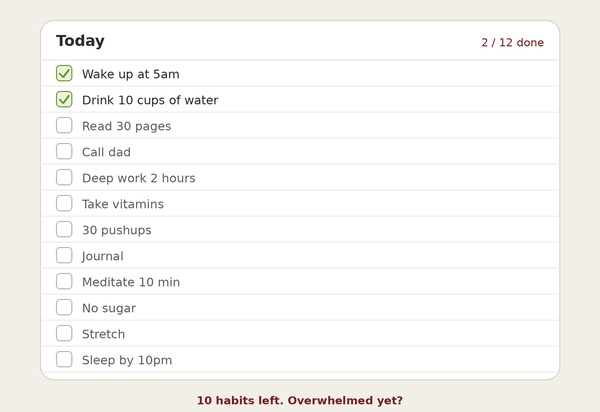
Tracking too many habits is like juggling 10 balls as a novice. At first, it looks fun and doable. But you’ll get overwhelmed and frustrated quickly. Focus on 1-3 important habits first to build momentum, while ensuring they stick. After that, you can add more.
How Loop Tracker Fixes This
Aside from allowing you to set daily habits, the Loop habit tracker also supports flexible scheduling. Meaning, you can set habits based on custom frequencies, like 3 times per week, every 4 days, 7 times per month, or 5 times in 20 days.
This allows you to spread habits out logically instead of cramming everything into a daily checklist that feels so overwhelming. Additionally, Loop Habit Tracker has a simple minimalist design that makes it easy to manage multiple habits without feeling drowned.
Obsessing over streaks
Streaks are motivating. Until life happens and you miss a day. In a study tracking over 1,200 people using habits apps, researchers discovered that streak visualization raised dropout rates by roughly 2.7x after week 5, especially when users missed a day.
What does this mean?
When people lose a streak, they feel frustrated, sad, and discouraged. One researcher put it perfectly: “Losing a maintained streak feels like losing the work you’ve done, which motivates you to keep going. At the same time, the ongoing streak is a “bright and shiny” goal, almost like a prize, that makes each day’s effort more meaningful.”
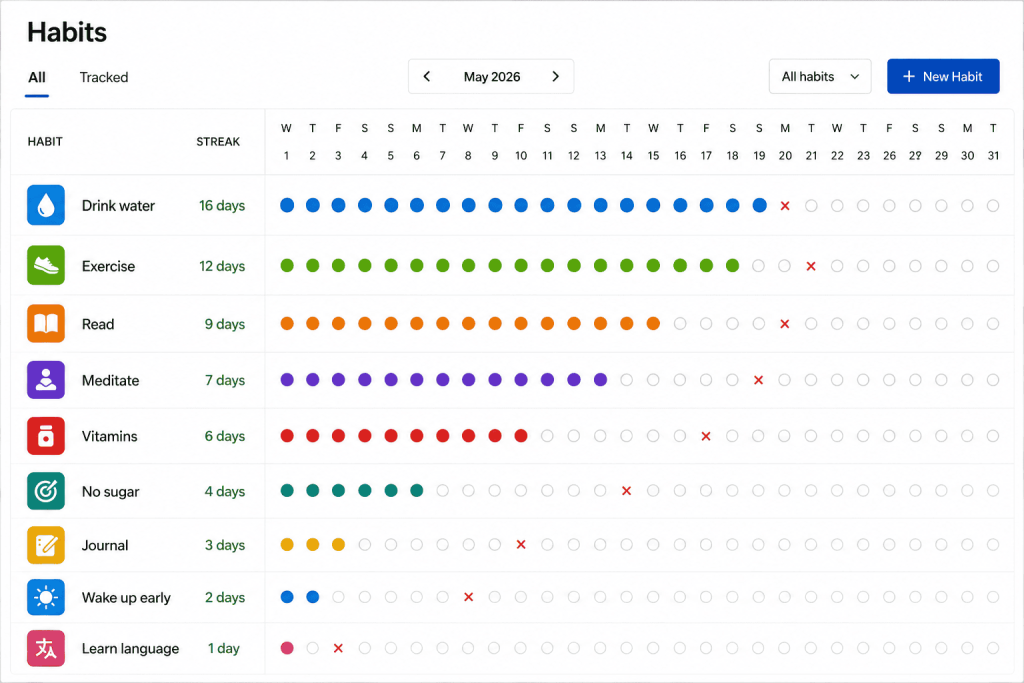
Moreover, the thought of losing a 45-day streak can create anxiety, which can impact your mental health negatively. Many people abandon habit trackers because of this.
According to Trick-Two497, a Reddit user: “Habit trackers increase my anxiety. I don’t need that, so I don’t use them.”
Behavioral experts recommend focusing on consistency, not perfection. Your ability to build healthier habits depends on how easy you reengage after lapses, not perfect streaks.
How Loop Tracker Fixes This
Loop Habit Tracker won’t guilt-trip you to keep you engaged. Unlike many habit trackers, it doesn’t reset your streak to zero after a missed day.
Loop Habit Tracker focuses on long-term patterns, not just impressive streak numbers. It does this by providing detailed graphs and stats that show how your habit performance improves with time.
Here’s what Paulina Drozdowska, a user, had to say: “I like this because it doesn’t punish me for missing a day. Most habit apps include streaks and bright red markers, which really puts me off as the negative effect of a big red X outweighs the motivation to keep a clean streak.
“This app doesn’t have that problem. When I skip a day, it’s no big deal, no need to beat myself up about it, just try again tomorrow…”
Loop habit tracker prioritizes progress over perfection.
Notification Fatigue
Imagine a habit tracker buzzing your phone every 10 minutes reminding you to do 30 push-ups. At first, it appears cool and helpful. Later? Super-annoying. Eventually? It becomes intrusive and relentless like a nagging pest. So you ignore or cut them off altogether.
Sometimes, it’s not always the frequent, poorly timed, and aggressive notification that forces people to ditch habit tracking. But the cognitive tax it incurs.
The thing is, even if you don’t check your phone, being aware of the notification can break your concentration. And according to research, it can take over 20 minutes to regain focus after an interruption.
How Loop Tracker Fixes This
Loop Habit Tracker uses reminders. But doesn’t bombard users with annoying alerts that follow you around all day like your clingy cat.
Here is what it does: It allows you to create reminders for each habit. You get to choose the hour of the day, time, and what to be reminded about.
One user reviewing the tool on Google Play explains: “…I think the notification bar reminders are a great idea, and ideal for me. I don’t find it as annoying as other apps; it’s very customizable (e.g. reminders, working days only goals) and has a simple, clean interface.”
Loop Habit Tracker is also ad-free. So no annoying pop-ups or distractions when trying to mark off a habit for the day.
What Makes Loop Habit Tracker Different from Others?
| Aspect | Loop Habit Tracker | Other Habit Trackers |
|---|---|---|
| Pricing | Completely free forever. Contains no ads or paid tiers. | Often has a freemium model with paywalls or subscriptions. |
| Open Source & Transparency | Fully open-source code; community-driven. | Closed source; developers control the feature roadmap. |
| Privacy & Data Storage | Works offline with all data stored locally. No accounts required. | Often requires accounts and cloud sync, with data stored remotely. |
| Design / UI | Minimalistic, simple, distraction-free interface. | Some have more flashy, cluttered UIs or ads. |
| Habit Scheduling | Supports flexible custom schedules, such as alternate days or 3× per week. | Others may limit users to daily or weekly schedules with less flexibility. |
| Progress Analytics | Detailed graphs and habit strength scores. Track progress without guilt or streak pressure. | Many apps focus on streaks and red X's, which can guilt-trip users instead of motivating them. |
| Reminders | Custom reminders per habit with direct notification actions. | Reminder features vary and may require a subscription. |
| Platforms | Android only (no iOS or web). | Many competitors offer cross-platform sync across iOS, web, and desktop. |
| Sync & Backup | Manual backups and export options (CSV/SQLite). | Cloud sync and automatic backups are often available. |
How to Use Loop Habit Tracker?
Step 1: Start with Fewer Habits
Tracking many habits feels doable until you give it a try. Then you realize how overwhelming and stressful it can be.
MeekHat, a Reddit user, explained why:
“I had a whole bunch of things that I wanted to do repeatedly, and I’d wake up with like 10 items on the list…Eventually I found that an unsustainable strategy, and I started skipping some habits on some days…It all became too much stress. I’ve deleted most of the habits now.”
When it comes to tracking habits, less is more.
But I get it, sometimes you feel pumped up and eager to level up all aspects of your life immediately. So you track 7 habits at once, starting with “wake up at 5. am, drink 10 cups of water, read, call dad, deep work for 2 hours, take vitamins, and do 30 push-ups”
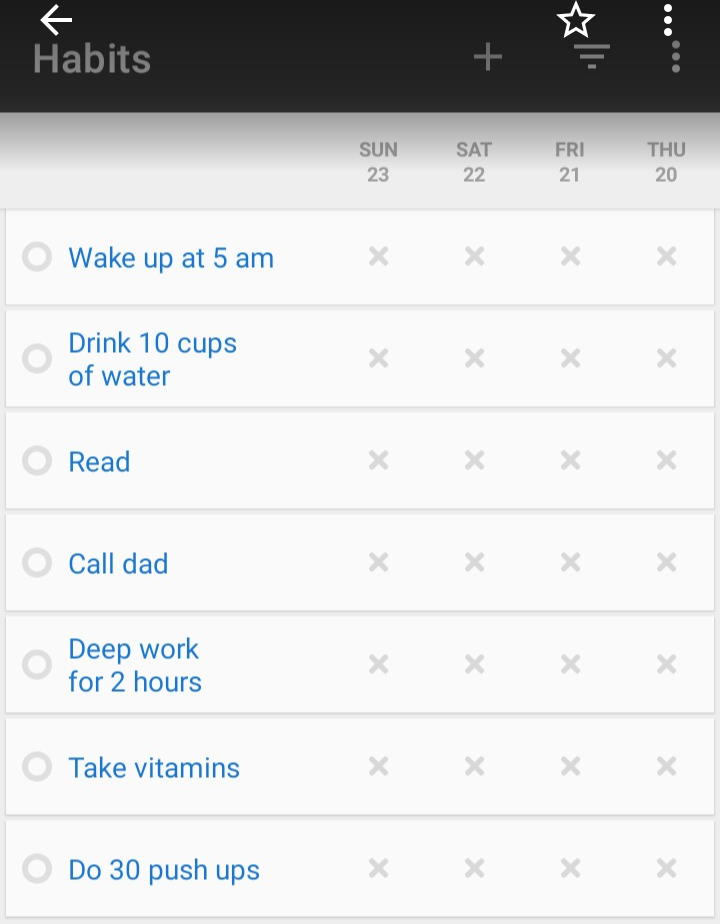
The truth is, tracking many habits does more harm than good.
Think about it.
How do you stay consistent when tracking 15 habits? What happens when you miss 7-8 habits daily? Will you still feel that surge of motivation whenever you open the app? Or will it be replaced with pure guilt?
Loop Habit tracker allows you to track unlimited habits for free. However, you should start with 1-3 habits.
Research from BJ Fogg at Stanford shows that small, focused changes succeed where ambitious multi-habit plans fail. So start small. Build momentum. Rack up those small wins before adding other habits.
Step 2: Set Up Habits Correctly in Loop
Loop habit tracker lets you track two types of habits: yes/no or measurable.
Yes/No
The yes/no habits are those types of tasks where you mark “done” or “not done.” They are simple, straightforward, and easy to set up with a few clicks.
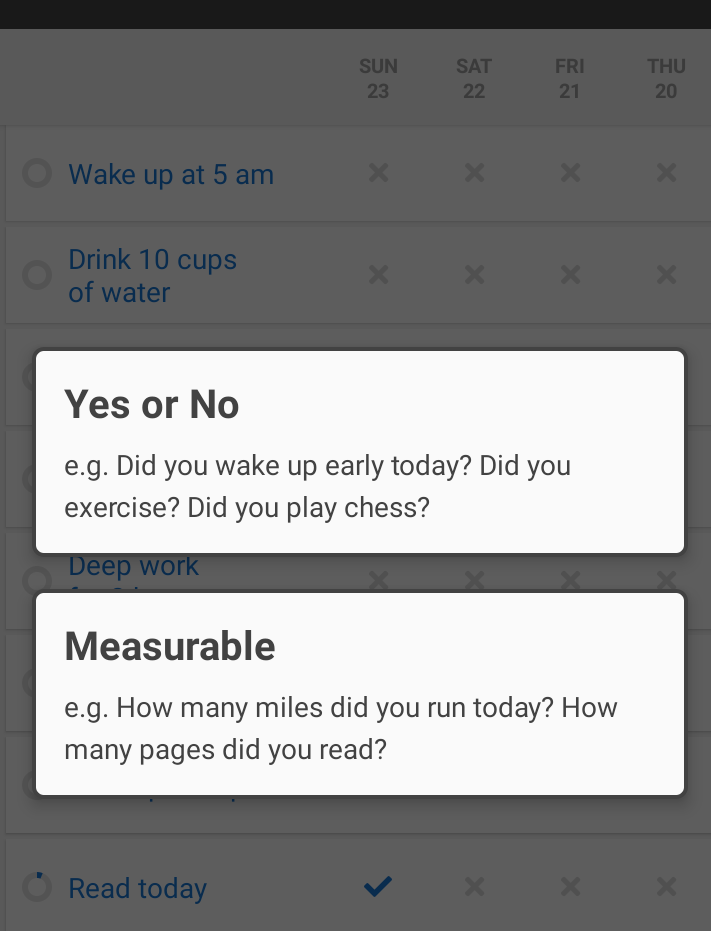
Examples:
- Read today?
- Went shopping?
- Called Mom today?
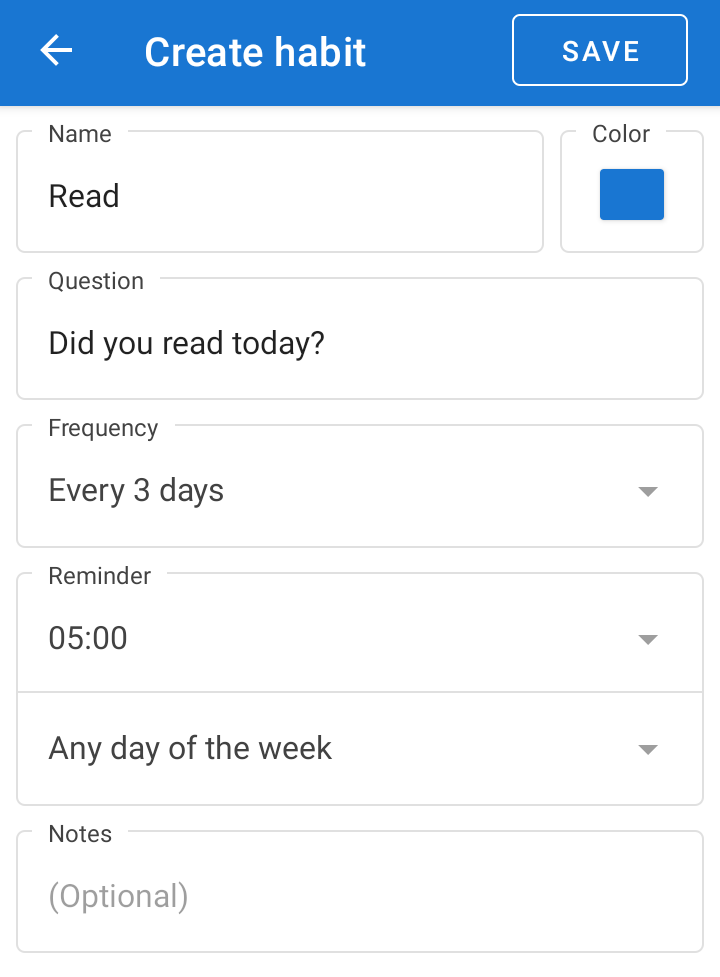
You can choose the frequency at which you perform the habits. It could be every day, a set number of days, a certain number of times per week/month, or even a certain number of times within a given period.
And it gets better.
Loop habit tracker also allows you to add notes, choose colors, and set reminders for each habit.
Yes/no habits are ideal when:
- The habit is simple
- Building new habits
- You only care about if it’s done.
- You want an easy win and quick consistency.
Measureable habits
Loop also allows you to measure habits by assigning numbers to your daily goals. You can assign units (miles walked, cups drank, ounces, sleep hours, etc.), daily targets, and frequency (daily, weekly, or monthly) for each habit.
Examples:
- How many miles did you run today?
- How many pages did you read today?
- How many ounces of protein did you take?
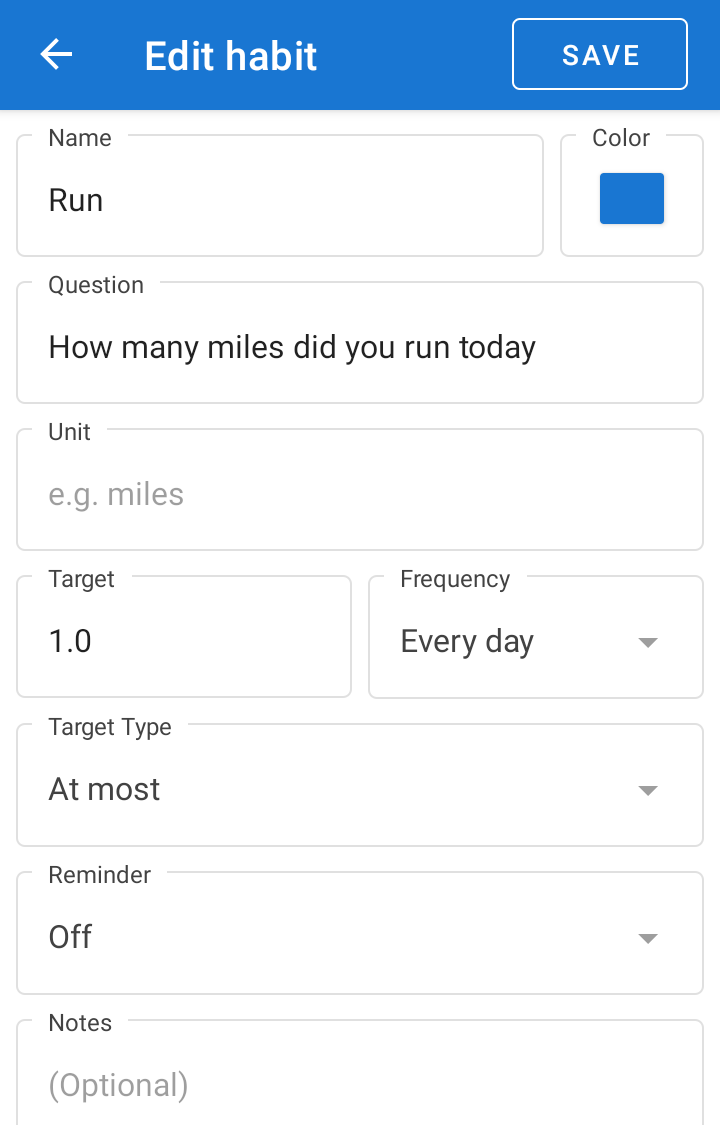
Unlike yes/no habits, measurable habits provide you with detailed data. For instance, you can see how many miles you ran in a month, how often you ran each day, and your performance over a chosen period.
This helps you understand how much you are improving. So you can make informed adjustments where necessary.
Use measurable habits when:
- Effort is important
- You prioritize insights more than completion.
- The habit has a clear quantity target (e.g., do 50 pushups daily)
Setting Realistic Schedules
Loop habit tracker doesn’t restrict you to the typical daily habits. Instead, it allows you to set custom frequencies for each habit, making it easy to log those with complex schedules.
Want to read a book once a week, visit the gym every 2 days, or clean your room twice in 14 days? Loop customizable scheduling has you covered! This flexibility makes it easy to set realistic schedules, reducing burnout and boosting consistency.
Step 3: Use Streaks as Feedback, Not Pressure
Chances are you abandoned your last habit tracker due to streak anxiety. And I get it. Most habit trackers pressure users to maintain perfect streaks.
They reset streaks after a single miss, displaying huge numbers and colorful streak bars that make you dread missing a day.
Successful-Mud-3614, a Reddit user, perfectly captures the frustration:
“…Most habit apps turn into either guilt machines or boring checklists once the novelty fades. What kills it for me is streak anxiety; one missed day and I’m done. I wish more apps focused on flexible progress, context, and accountability instead of perfection.”
Loop habit tracker focuses on long-term consistency instead of perfect streaks, using visual data like graphs, charts, calendar view, and statistics to show your progress over weeks and months. This helps you celebrate consistency, even if you miss a few days here and there.
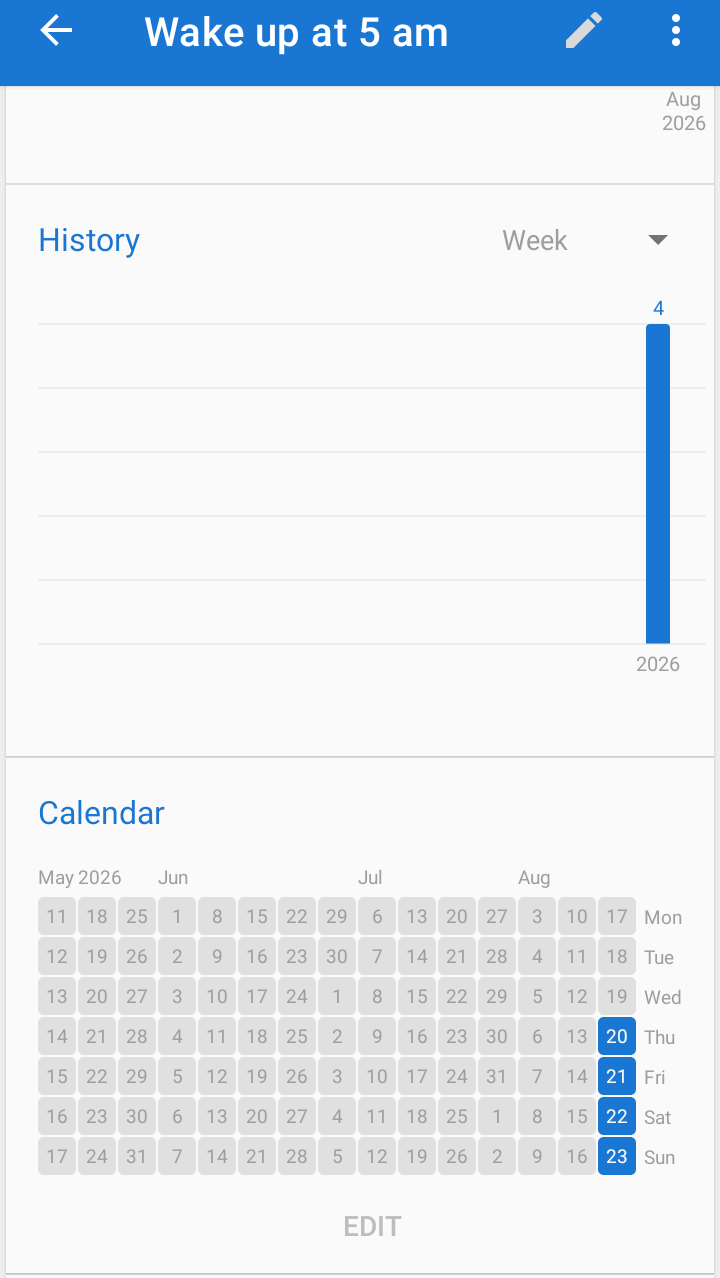
Loop tracker also offers flexible scheduling, which allows you to set custom frequencies (daily, monthly, weekly, a certain number of times per week/month) for habits. This ensures that habits are tracked realistically. And since habits are done at intervals and not every day, it makes you less obsessed about maintaining daily streaks.
Here is what one user reviewing Loop on Google Play had to say: “I really needed something that let me list things I am trying to get better at that doesn’t necessarily ‘punish’ you for not completing tasks.
This is great to let me list the things I want to improve upon while not making me feel guilty or bad (and thus stop trying) if I miss something. It makes it easier for me to organize my to-do lists and see an improvement.”
Loop habit tracker minimizes pressure around maintaining a perfect streak, shifting your focus to long-term progress. The result? Tracking your habits becomes less stressful and more effective.
Step 4: Review Your Progress Weekly
A 2025 study of successful habit-formers found that 87% regularly reviewed their tracking data and made systematic adjustments to their approach.
You should do the same.
Reviewing your progress weekly helps you Understand your performance and identify areas that require improvement. Loop habit tracker integrates stats, line graphs, and charts that make the process effortless.
How to Read Loop’s Stats and Charts?
1. Habit score
The score is calculated based on each repetition and miss. It increases if you repeat a habit and reduces if you miss.
The good thing? Unlike many traditional habit trackers, missing a few days after a lengthy streak won’t have a drastic effect on your progress. You can view the habit score at the top of the page after clicking a habit, usually presented as a percentage.
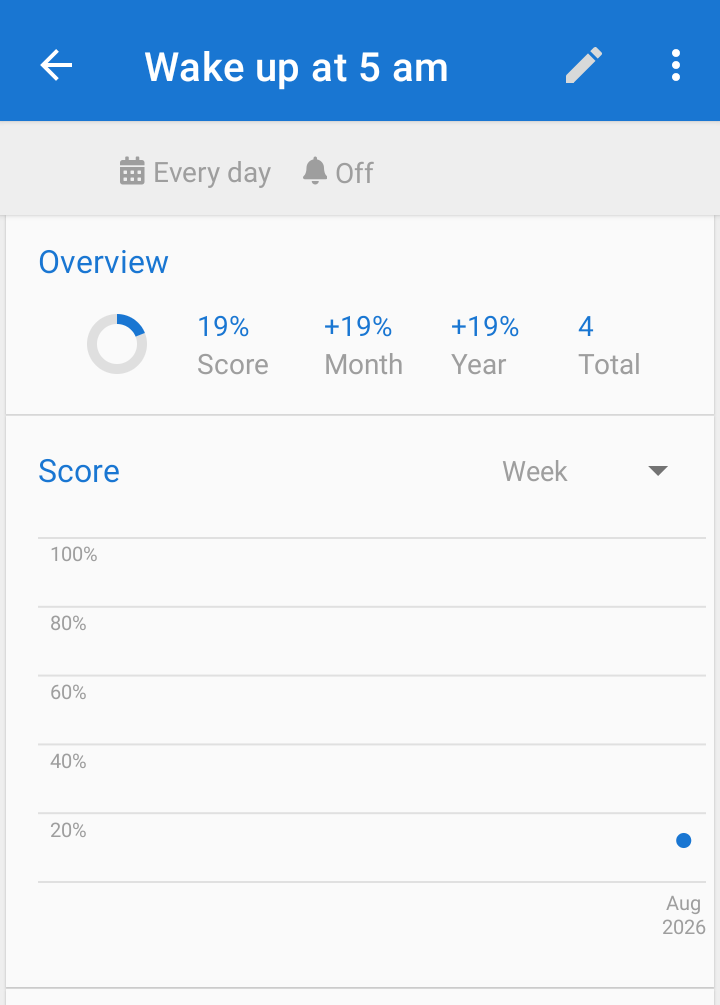
2. Trends over time (charts, stats, etc.)
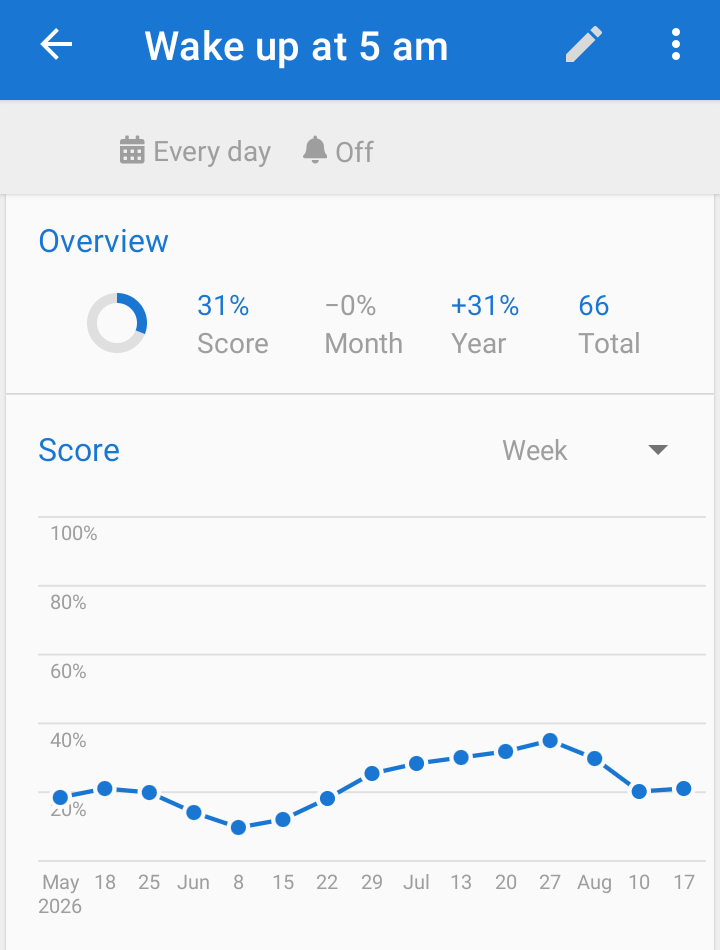
Loop shows visual data that indicates your performance over time. They include line graphs, bar charts showing the history of your habits, calendar overview, and frequency statistics.
Each visual offers you a big picture of your progress. Plus, they help you identify patterns that are hard to spot from daily check-offs. For instance, the line graph in Loop shows how consistent you are with a habit.
The bar chart, meanwhile, shows how often you perform a habit, either weekly, monthly, quarterly, or yearly.
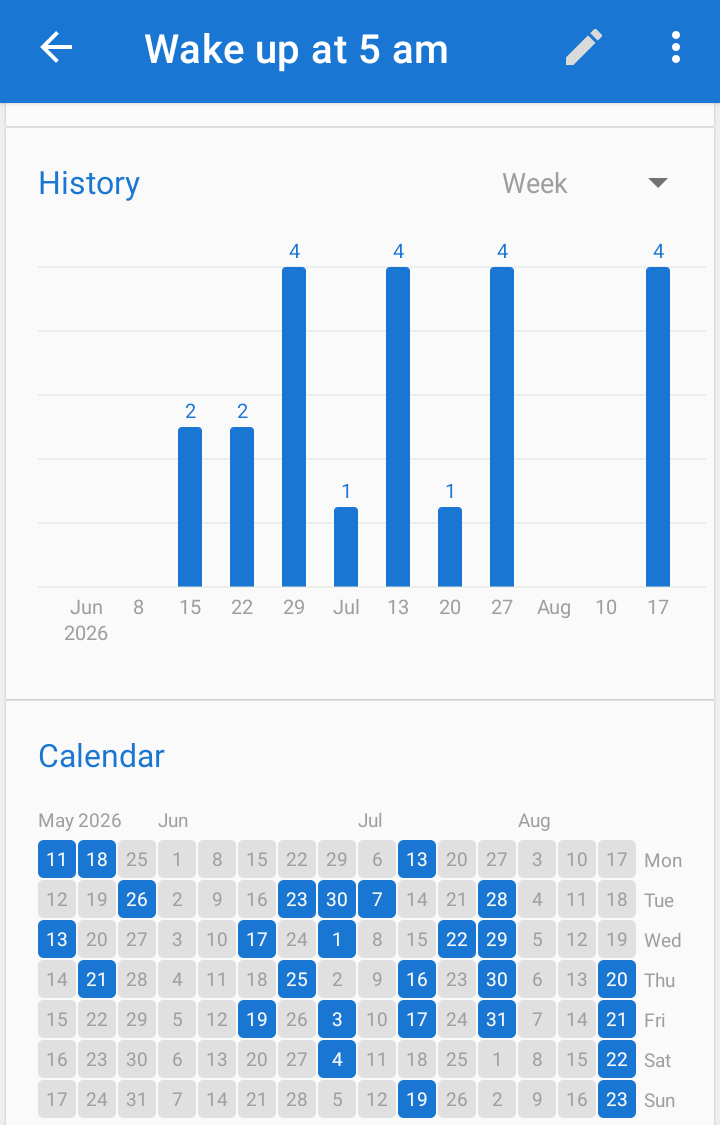
Lastly, the calendar overview shows days marked off (often colored), and days you missed or skipped (often plain). The insights gathered from these data can help you visualize your progress and make informed adjustments where required.
What to Look for in Your Reviews?
Is there a habit you were consistent with but suddenly started skipping? A sharp drop-off might indicate that the habit was unrealistic. Or maybe you became preoccupied with personal matters and couldn’t keep up.
Noticing this early allows you to make necessary adjustments to avoid abandoning the habit entirely as a result of accumulated missed days.
You should also look for recurring trends. Does one habit lag behind another? Do you meditate more during weekends? Do you struggle with evening habits whenever you have a visitor? Or are you more fired up on Mondays?
Looking at these patterns helps you understand when and why you struggle with some habits and succeed with others. Once you note them, you can readjust your schedule or split habits into bits to improve consistency.
Step 5: Adjust Habits Instead of Quitting
Most people don’t realize this. But you’ll quit in your first attempt to build a habit. The reason is simple.
Research shows that 22% of users abandon habit apps within the first 30 days. And almost half of new users quit within two months.
But here is the thing…
Loop habit tracker is designed to help you stick to your habits even when things aren’t going your way.
But how?
By providing you with habit tracking data that helps you visualize your progress, shifting your focus from attaining a perfect streak to long-term consistency. Plus, it allows you to simplify your habits and set customizable schedules for each task.
When to Simplify habits?
Do you frequently miss a habit? Maybe you aim to read 4 chapters of a book daily, but find it hard to keep up. Rather than throw in the towel, consider reducing your goals.
And here’s why.
When faced with an intimidating goal, the brain may perceive it as a threat, resulting in avoidance. However, breaking goals into smaller, specific tasks makes it feel manageable and easier to start.
For instance, instead of reading 5 chapters of a book daily, you can reduce it to 1. Or instead of walking for 30 minutes, start with 15 minutes to build momentum and stack small wins.
When to change Schedules
Sometimes the habit isn’t the issue. The timing is. So how do you know? Check your Loop data. Look for trends like:
- You struggle with habits during weekdays but succeed on weekends.
- A habit you do daily is starting to bore you.
- You complete habits easily in the night but struggle in the morning.
Loop allows you to customize your schedule. You can set habits based on custom frequencies like daily, monthly, weekly, or a certain number of times per week/month.
How Ken Hit a 211-Day Reading Streak Using Loop Habit Tracker
Case Study
Ken is a book lover who was eager to build a daily reading habit. But like most people, he struggled with consistency. So he tried creating a daily checklist, but it was fruitless. He’d read a few pages one day and skip reading for the next 7-10 days.
The cycle went on and on. Soon, he had piles of books that sat on his shelves unread. Guilt, disappointment, and frustration started to creep in. That was when he discovered the Loop habit tracker.
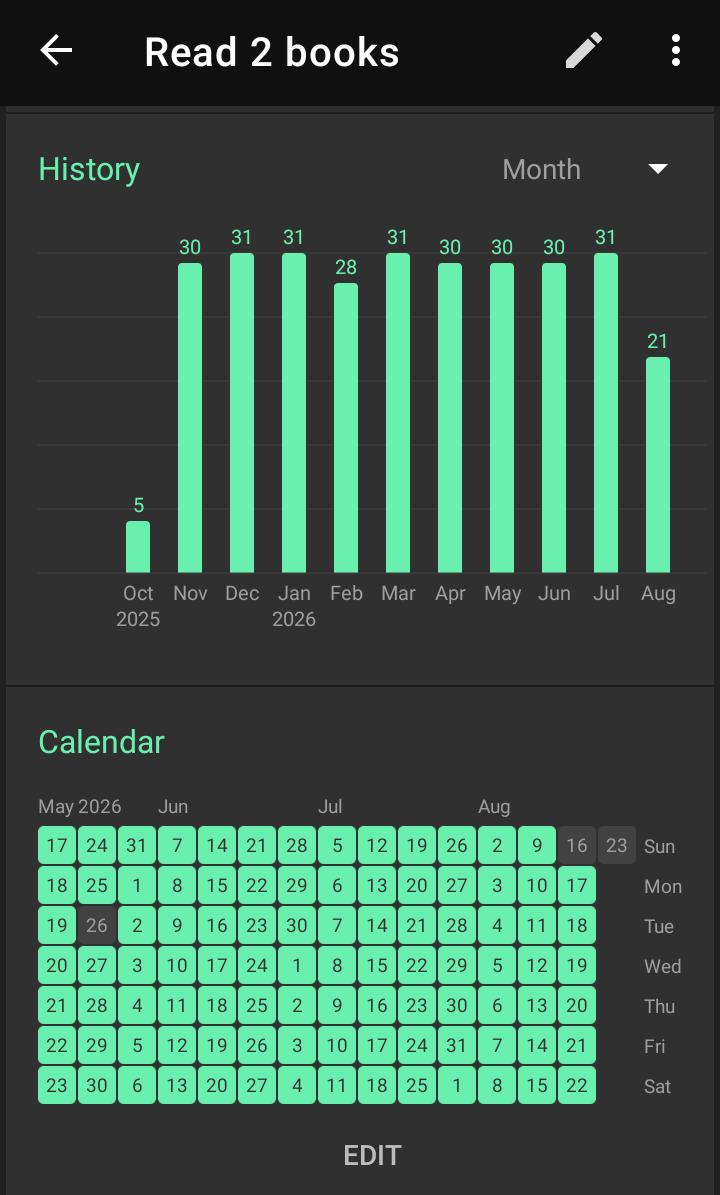
Using the yes/no habits, Ken was able to maintain a consistent daily reading routine. He recently ended a 211-day reading streak with a habit score (percentage that shows how often a habit is performed) of 95%.
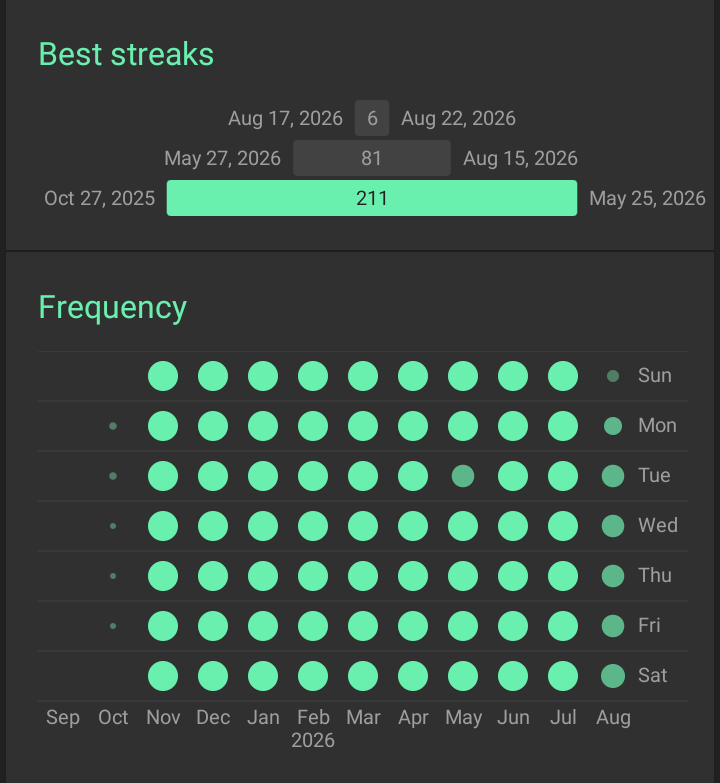
Thanks to Loop’s simplicity, Ken was able to track his habit efficiently while visualizing his progress via detailed stats, graphs, and charts.
A word from him:
“As a bibliophile, buying books wasn’t a problem; reading them was. In 2025, I struggled to read consistently. But that changed when I discovered the Loop habit tracker. I like that it allows me to set up habits with a few clicks.
I also love its clean UX, simplicity, and straightforwardness. Best of all, it doesn’t guilt-trip me whenever I miss a day. I’ve tried out many habit trackers, and I can confidently say that Loop is the best”
Common Mistakes New Loop Users Make
Want Loop to work for you instead of being “another” habit tracker app you abandon? Avoid these mistakes:
- Tracking too many habits: It’s normal to feel fired up and want to track 15 habits simultaneously as a new Loop user. However, doing so might be overwhelming, causing you to abandon the app. Start with 1-3 habits. Once they become automatic, add more.
- Ignoring weekly reviews: Weekly reviews are like looking at your bank account statement. Without them, you can’t tell areas that are good and those that need improvement. And how do you even spot trends or understand how you performed the past week?
- Treating missed days as failure: I understand how it feels to miss a day. However, missed days aren’t failure but feedback. Obsessing over them is like missing one gym session and thinking your fitness progress is gone. You should care less about achieving a perfect streak and more about consistency.
Who Loop Habit Tracker Is Best for?
- People rebuilding consistency: Are you trying to rebuild consistency after falling off track? Loop Habit Tracker can help. It features rich stats, visuals, and a habit strength algorithm that helps in monitoring and visualizing your progress, achieving long-term consistency.
- Minimalists: Loop is perfect for people looking for an easy-to-use tracker with a simple and clean interface that makes tracking less overwhelming. It’s straightforward and doesn’t contain unnecessary distractions that steal your focus away from the habits you want to build.
- Long-term habit builders: People looking to build long-term habits should also consider Loop. It has a habit strength algorithm that measures your consistency and not your current streak. This keeps you motivated even if you miss a day here and there. It also has detailed graphs and stats that help you visualize your progress over time.
Who It’s Not For
- Users who want heavy gamification: Loop lacks gamified features. It keeps things simple, making the tracker a less appealing option for people requiring points, badges, or flashy rewards to stay motivated.
- Short-term motivation seekers: Loop prioritizes long-term habit building over instant gratification. So if you are looking for an app that pushes you with daily motivation or rewards, look elsewhere.
Long-Term Habits Are Built with Systems
You don’t need to read 7 books on motivation or willpower to build lasting habits. You need systems; structured routines and processes that make a habit easy to repeat.
Loop habit tracker helps you create flexible systems that make building long-term habits easy and fun. It’s simple, clean, and straightforward—you open it and log your habit in 3 clicks.
The best part? It doesn’t make you feel bad for missing a day. As it prioritizes your progress and consistency over attaining a perfect streak.
And yes, it comes with detailed graphs and statistics that show your improvements over time. Here is the interesting part: it’s completely free. So why wait? Download Loop habit tracker and start building better habits today!